They resurrected this image from many years ago: www.flickr.com/photos/nda/37361709/in/set-465146/. It features the old LC/Performa/Quadra 630 (a Macintosh, nonetheless!) to illustrate a news item about a Facebook Trojan on its’ Webware website.
On Flickr I collected a whole set of similar illustrations, called “Macs@CNET”, all featuring Apple computers. See www.flickr.com/photos/nda/sets/465146/
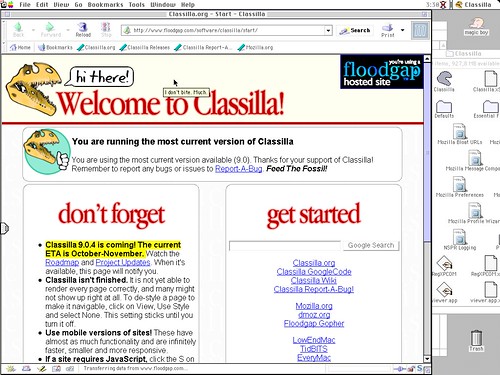
I finally managed to download and try a bit a copy of Classilla on a Powerbook G3.
Not only it’s a free, open source browser aimed at making (again) the world wide web a bit more usable for Mac OS 9 (and Mac OS 8.6) Macs but it’s also a project with a strong sense of humor as you can see from this screenshot.
In the future I plan to keep using it and will try to report. In the meanwhile, what can I say other than.. welcome on my hard disk, Classilla! :)
Here’s an error from the Chromium for Mac build 4.0.208.0 (25971) (when launched in the Terminal, with the —enable-sync flag which still has no effect, by the way):
“[556:267:4696610131638:ERROR:/b/slave/chromium-rel-mac/build/src/chrome/browser/cocoa/bookmark_editor_controller.mm(77)] Not implemented reached in void -[BookmarkEditorController awakeFromNib](BookmarkEditorController*, objc_selector*)”
Which by the way contradicts what MG Siegler of TechCrunch wrongly stated at the end of http://www.techcrunch.com/2009/08/31/builds-of-chrome-get-updated-to-show-off-their-snow-leopard-spots/ about the bookmark manager being available on Macs.