Since Mac Chromium 4.0.224.3 (29991) which was released on 23rd October 2009 it is possible to drag n’ drop urls into the Bookmarks Bar.
The feature is not yet available in the latest Google Chrome for Macintosh, which is 4.0.223.11
p.s. Yes, I downloaded and tried out every build of that day to identify the exact one which has the feature enabled.
I appreciate and use a lot the social bookmarking features of Delicious but there are some issues which detract from the otherwise great experience of the site.
So here’s a list of pleas suggestions for the Delicious team about some things they could (and should) fix in the next version/revision.
- When you click on the “save” button to add a bookmark to your account, Delicious could (and should) also copy the valuable “Notes” field (i.e. the description)
- In the same way it could (and should) also copy the tags. In the meantime there’s a nice javascript bookmarklet that does it also adds a via:username tag
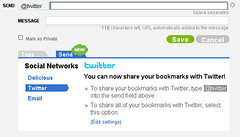 Disable the global “send” (i.e. sharing) of all bookmarks on Twitter and make it only a per item option.
 - Also: when sharing on Twitter Delicious could (and should) add automatically the title of the bookmark since the url shared on twitter show up as just a “mistery meat” icio.us with no clue about the content and destination.
- In the Network list it would be nice if the apostrophes wouldn’t show up as Html entities
Here’s an error from the Chromium for Mac build 4.0.208.0 (25971) (when launched in the Terminal, with the —enable-sync flag which still has no effect, by the way):
“[556:267:4696610131638:ERROR:/b/slave/chromium-rel-mac/build/src/chrome/browser/cocoa/bookmark_editor_controller.mm(77)] Not implemented reached in void -[BookmarkEditorController awakeFromNib](BookmarkEditorController*, objc_selector*)”
Which by the way contradicts what MG Siegler of TechCrunch wrongly stated at the end of http://www.techcrunch.com/2009/08/31/builds-of-chrome-get-updated-to-show-off-their-snow-leopard-spots/ about the bookmark manager being available on Macs.
No such thing here, yet.
The social aspect of Delicious has (finally) got a little boost.
Now you can “send” bookmarks from Delicious not only to other users who are in your network but also as a message on Twitter and via e-mail.
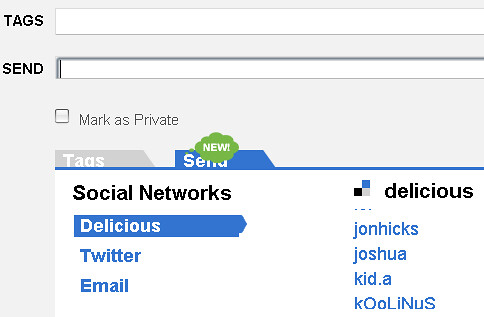
Here’s how the two options look like.
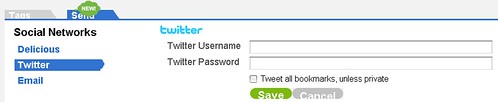
To send a link to Twitter you have to login to your account.
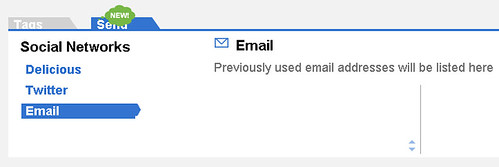
And here’s the e-mail forwarding. The form states that Delicious will remember and list e-mail addresses, in the same way it now does users from your network.
Using the command line
/Applications/Chromium30196.app/Contents/MacOS/Chromium --enable-extensions
looks like I was finally able to install the Unofficial Chrome Delicious Extension on Chromium 3.0.196 for Mac.
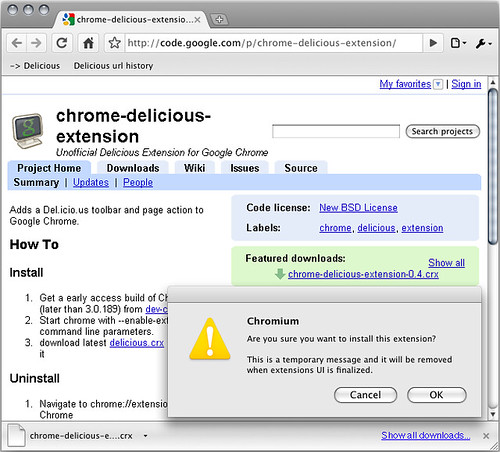
More on this later.
The extension has been installed and loaded but doesn’t appear to be working. :(
In the Rule Torrent of Wired’s “How to Behave/ New Rules for Highly Evolved Humans” I noticed this line:
Tag Flickr photos freely—there’s no such thing as too many tags
On the same note here’s Joshua Shachter in 2006 speaking of tags on Delicious:
[…] letting people use their own tags–instead of choosing them from a menu he provided–would make del.icio.us more likely to be genuinely useful. Each person who uses del.icio.us is effectively coming up with an idiosyncratic system for classifying the Web: an article about, say, Dallas Mavericks owner Mark Cuban might be tagged “Mavericks” by one person, “crazy” by another, and “Mavericks” and “crazy” by a third. (Del.icio.us allows users to pin as many tags on a page as they want.)
Looks like in Mac Chromium 3.0.195 it is now possible to delete a bookmark from the bookmark bar by ctrl-clicking (or right-clicking) on it. :)
If I’m not mistaken links in webpages are now draggable although still can’t be dropped on the bookmark bar. :/
