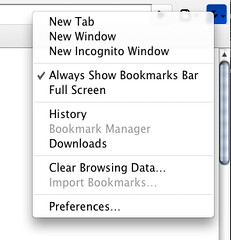
Here’s an error from the Chromium for Mac build 4.0.208.0 (25971) (when launched in the Terminal, with the —enable-sync flag which still has no effect, by the way):
“[556:267:4696610131638:ERROR:/b/slave/chromium-rel-mac/build/src/chrome/browser/cocoa/bookmark_editor_controller.mm(77)] Not implemented reached in void -[BookmarkEditorController awakeFromNib](BookmarkEditorController*, objc_selector*)”
Which by the way contradicts what MG Siegler of TechCrunch wrongly stated at the end of http://www.techcrunch.com/2009/08/31/builds-of-chrome-get-updated-to-show-off-their-snow-leopard-spots/ about the bookmark manager being available on Macs.
If you want to follow closely the development of Google’s browser for the Macintosh or you just want to be up to date with your Chromium version the url to go is the “LATEST” directory at http://build.chromium.org/buildbot/continuous/mac/LATEST/
This directory always offers the freshest automated build from the current day (which sometimes includes more than twenty builds).
If you consider this tedious and you don’t want to manually download, unzip and replace your copy of the browser in /Application there are two handy scripts that can help you automatically doing that.
The first is Chromium Updater, an AppleScript by Dom Barnes, now at version 0.2.
The second is the similarly named Chromium Updater, a faceless app done with Automator, provided by a developer working for TechCrunch.
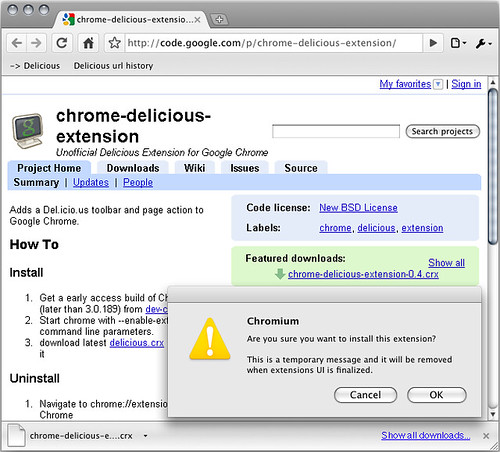
Using the command line /Applications/Chromium30196.app/Contents/MacOS/Chromium --enable-extensions
looks like I was finally able to install the Unofficial Chrome Delicious Extension on Chromium 3.0.196 for Mac.
More on this later.
The extension has been installed and loaded but doesn’t appear to be working. :(
Looks like although not yet ready, bookmark editing is coming up on the Mac version of Google’s browser. This contextual menu was not present at all a couple of days ago at the beginning of July (in 3.0.192) and popped up around the 7th of the month (with (3.0.193).
On the other hand there’s still no drag n dropping of links into the bookmark bar.