Five things Delicious could (and should) fix

Pubblicato il: 19/10/2009 — Tematiche: Web 2.0, bookmarking, del.icio.us, english, informazioni, segnalazioni

I appreciate and use a lot the social bookmarking features of Delicious but there are some issues which detract from the otherwise great experience of the site.

So here’s a list of pleas suggestions for the Delicious team about some things they could (and should) fix in the next version/revision.

  1. When you click on the “save” button to add a bookmark to your account, Delicious could (and should) also copy the valuable “Notes” field (i.e. the description)
  2. In the same way it could (and should) also copy the tags. In the meantime there’s a nice javascript bookmarklet that does it also adds a via:username tag
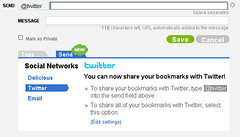
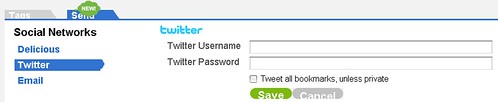
  3. Delicious send - Twitter @Disable the global “send” (i.e. sharing) of all bookmarks on Twitter and make it only a per item option.
  4. Also: when sharing on Twitter Delicious could (and should) add automatically the title of the bookmark since the url shared on twitter show up as just a “mistery meat” icio.us with no clue about the content and destination.
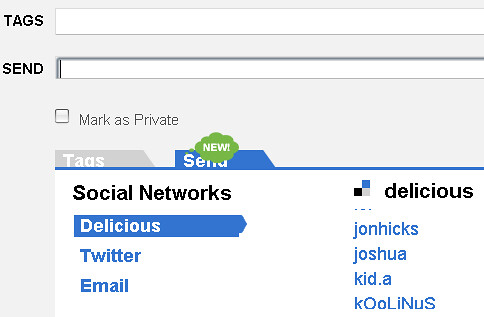
  5. In the Network list it would be nice if the apostrophes wouldn’t show up as Html entities
Mac Chrome 4.0.212.1 (with notes)

Pubblicato il: 29/09/2009 — Tematiche: Apple, chromium, del.icio.us, english, immagini

Mac Chrome 4.0.212.1

If the picture doesn’t show or the notes are not present please see the original on Flickr.

Now this is strange…

Pubblicato il: 05/08/2009 — Tematiche: bookmarking, chromium, del.icio.us, english, immagini

Now this is strange...

Chromium for Mac 3.0.198 when launched normally shows themes (there are two available so far) as extensions but doesn’t load the Delicious extension. For that you still need to launch the browser with the –enable-extensions flag

So: are there two kind of extensions?
Or browser themes (also known as skins) aren’t really extensions according to Chrome/Chromium?

Delicious send – Now with for: notes?

Pubblicato il: 04/08/2009 — Tematiche: bookmarking, del.icio.us, english, immagini

Delicious send - Now with for: notes?

Looks like the new "send" feature of Delicious allows you to add a short message (116 characters) to other users, i.e. the ones in the "for:username" tags. Yay! :)

And there’s even more new stuff!

Send bookmarks from Delicious

Pubblicato il: 04/08/2009 — Tematiche: bookmarking, del.icio.us, english, immagini

The social aspect of Delicious has (finally) got a little boost.
Now you can “send” bookmarks from Delicious not only to other users who are in your network but also as a message on Twitter and via e-mail.

Delicious send

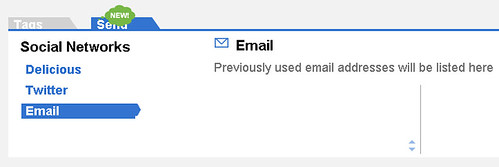
Here’s how the two options look like.
To send a link to Twitter you have to login to your account.

Delicious send - Twitter

And here’s the e-mail forwarding. The form states that Delicious will remember and list e-mail addresses, in the same way it now does users from your network.

Delicious send - e-mail

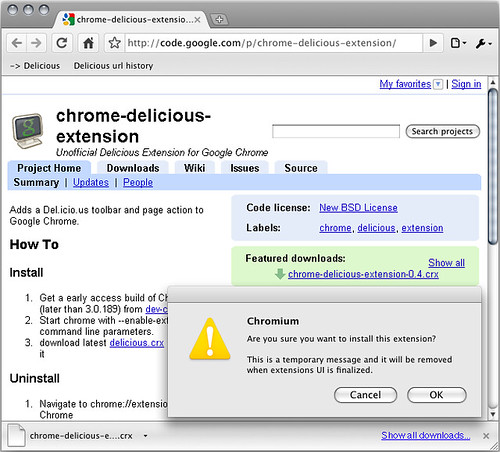
Unofficial Delicious extension for Chrome finally working on a Mac?

Pubblicato il: 22/07/2009 — Tematiche: bookmarking, chromium, del.icio.us, english

Using the command line
/Applications/Chromium30196.app/Contents/MacOS/Chromium --enable-extensions
looks like I was finally able to install the Unofficial Chrome Delicious Extension on Chromium 3.0.196 for Mac.

unofficial Delicious extension with Mac Chromium 3.0.196

More on this later.
The extension has been installed and loaded but doesn’t appear to be working. :(

How to use Delicious with Google Chrome (or Chromium) on a Mac

Pubblicato il: 24/06/2009 — Tematiche: chromium, del.icio.us, english, idee, immagini, informazioni

Right now the Mac edition of the Chrome browser unfortunately doesn’t allow its users to add bookmarklets nor to modify existing bookmarks.

This means that it is impossible to install the Delicious bookmarklets that make so fast and easy adding bookmarks and using the service’s features.

However, there is a workaround: by modifying the file in which Google’s browser saves its bookmarks you can get a Delicious-enabled Chrome (or Chromium).

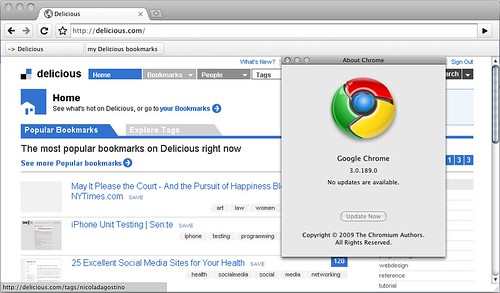
Here’s a proof:

Chrome Delicious hack


DISCLAIMER: what follows is an experimental solution, meant for advanced users who are aware of the risks. The author claims no responsibility whatsoever for the following content, which is provided as-is, and which can potentially damage your software and your data.


Here’s how you can do it.

Requirements:

-) An account on Delicious.com

-) A Macintosh with an Intel processor

-) An installed copy of Google Chrome for Mac

www.google.com/chrome/intl/en/eula_dev.html?dl=mac

or Chromium for Mac

build.chromium.org/buildbot/continuous/mac/LATEST/

The How-to:

1) If running, quit your copy of Google Chrome or Chromium

2) Download this file:

www.nicoladagostino.net/altro/bookmarksfile.txt

3) Rename it Bookmarks (with a capital B and no extension)

4) Go to
~/Library/Application Support/Google/Chrome/
(if you are using Google Chrome)
or to
~/Library/Application Support/Chromium
(if you are using Chromium)

5) Take out and/or replace the Bookmarks file which is in this directory with the download one

6) Launch Google Chrome o Chromium

7) Verify if the Bookmarks menu lists ” -> Delicious ” and ” my Delicious bookmarks ”

8) Login on Delicious.com

9) Send me some feedback if the two links work ;-)

Materiale più stagionato »