I appreciate and use a lot the social bookmarking features of Delicious but there are some issues which detract from the otherwise great experience of the site.
So here’s a list of pleas suggestions for the Delicious team about some things they could (and should) fix in the next version/revision.
When you click on the “save” button to add a bookmark to your account, Delicious could (and should) also copy the valuable “Notes” field (i.e. the description)
Also: when sharing on Twitter Delicious could (and should) add automatically the title of the bookmark since the url shared on twitter show up as just a “mistery meat” icio.us with no clue about the content and destination.
In the Network list it would be nice if the apostrophes wouldn’t show up as Html entities
In his column Ellis speculates about the effects it could have had on the comic book form, new artists and the whole market if it had been successful (which it was not).
“I’d like to try to convice you that the elements video, audio, canvas and img don’t belong here and should be dropped. Otherwise we’re poised to pollute the language even more (potentially indefinitely) as new media become popular (<smell>, <taste>, <caress> or <virtual -reality-helmet>, anyone?)”
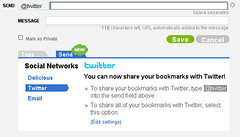 Disable the global “send” (i.e. sharing) of all bookmarks on Twitter and make it only a per item option.