I finally managed to download and try a bit a copy of Classilla on a Powerbook G3.
Not only it’s a free, open source browser aimed at making (again) the world wide web a bit more usable for Mac OS 9 (and Mac OS 8.6) Macs but it’s also a project with a strong sense of humor as you can see from this screenshot.
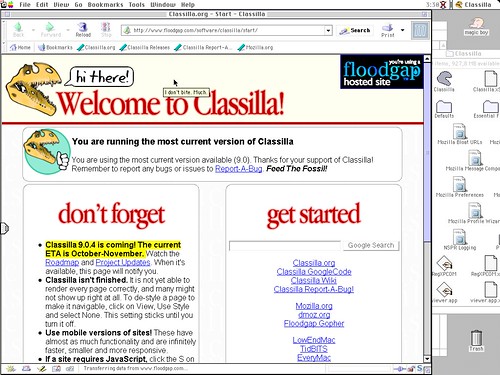
In the future I plan to keep using it and will try to report. In the meanwhile, what can I say other than.. welcome on my hard disk, Classilla! :)
Here’s an error from the Chromium for Mac build 4.0.208.0 (25971) (when launched in the Terminal, with the —enable-sync flag which still has no effect, by the way):
“[556:267:4696610131638:ERROR:/b/slave/chromium-rel-mac/build/src/chrome/browser/cocoa/bookmark_editor_controller.mm(77)] Not implemented reached in void -[BookmarkEditorController awakeFromNib](BookmarkEditorController*, objc_selector*)”
Which by the way contradicts what MG Siegler of TechCrunch wrongly stated at the end of http://www.techcrunch.com/2009/08/31/builds-of-chrome-get-updated-to-show-off-their-snow-leopard-spots/ about the bookmark manager being available on Macs.
No such thing here, yet.
I just installed the RSS Cloud plugin for WordPress by Joseph Scott.
More info in this piece from WordPress founder and CEO Matt Mullenweg:
RSS in the Clouds
If you want, take a look at the feed for nezmar.com which now includes the following code:
<cloud domain='www.nezmar.com' port='80' path='/?rsscloud=notify' registerProcedure='' protocol='http-post' />
Note to myself: when upgrading your WordPress installation always, alway, always remember to add back the
function remove_wpautop_content_filter() {

	remove_filter('the_content','wpautop');

}
function at the end of /wp-includes/functions.php
Otherwise the handy line
add_action('loop_start','remove_wpautop_content_filter');
you have in your theme PHP files and which removes WordPress’ automatic inserting of <P> (paragraphs) not only won’t work but it will also ruin your nice layout and spit a ton of errors.
And you don’t want that, right?
According to its creator, A tiny thread is written (mostly) in Python and runs on Google AppEngine.
In its first incarnation it amounted to just 208 lines of Python but Schacther notices that there’s “lots of code” in the tinythread + twitter + appengine backend.
If you want to follow closely the development of Google’s browser for the Macintosh or you just want to be up to date with your Chromium version the url to go is the “LATEST” directory at http://build.chromium.org/buildbot/continuous/mac/LATEST/
This directory always offers the freshest automated build from the current day (which sometimes includes more than twenty builds).
If you consider this tedious and you don’t want to manually download, unzip and replace your copy of the browser in /Application there are two handy scripts that can help you automatically doing that.
The first is Chromium Updater, an AppleScript by Dom Barnes, now at version 0.2.
The second is the similarly named Chromium Updater, a faceless app done with Automator, provided by a developer working for TechCrunch.
An url shortener allows you to create shorter URL’s and (sometimes) keeps track of how many times a link has been clicked. On the other hand, relying on third party services may have quite a few side effects.
According to Jeffrey Zeldman the solution is rolling your own mini-URLs [which]
lessens the chance that your carefully cultivated links will rot if the third-party URL shortening site goes down or goes out of business
If you are running for WordPress there are two solutions available, both in the form of installable plug-ins.
One is the Short URL Plugin which Zeldman recommends.
The other is La Petite Url which, John Gruber notes, includes support for Short URL Auto-Discovery.
