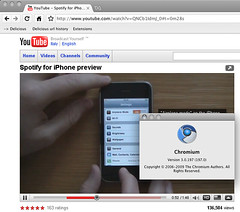
Mac Chromium – now with Flash support!

Pubblicato il: 02/08/2009 — Tematiche: Apple, appunti, chromium, english

Looks like Flash support is present in the Chromium builds and actually has been around for a while.

On the Macintosh version it’s available since version 3.0.195* and pretty much works (although with problems) and is present also in the Google Chrome beta, recently upgraded to 3.0.196.

Mac Chromium - now with Flash support!

To use the Flash plugin you have to start the browser with the –enable-plugins (two dashes, regardless of what you see here) option from the command line.
This is how you do it on a Mac if you have copied the Chromium app into your Applications folder:
/Applications/Chromium.app/Contents/MacOS/Chromium --enable-plugins

While if you have a recent release of Chrome use:
/Applications/Google\ Chrome.app/Contents/MacOS/Google\ Chrome --enable-plugins

Also, with newer builds of Chromium for Mac, such as the one from August, 2, 2009 there’s no need to use the command line to have Flash support

* I have tried launching version 3.0.194 (yes, I have kept around older releases for testing): Flash doesn’t work and using the –enable option returns a list of errors such as
4773:267:177542292698971:ERROR:/b/slave/chromium-rel-mac/build/src/chrome/browser/cocoa/location_bar_view_mac.mm(119)] Not implemented reached in virtual void LocationBarViewMac::OnInputInProgress(bool)

Here’s why it doesn’t work: 3.0.194 it doesn’t include three AV libraries which were added with 3.0.195 and are also present on recent Linux versions.

6 Comments 1 Comment

Ecco i commenti

  1. con la .197 non ho dovuto lanciarlo con parametri da linea di comando, funziona (una parola grossa) di default — non ci avrei nemmeno provato senza la tua segnalazione, grazie

    This comment was originally posted on FriendFeed

    Commento di alieb — 2 August 2009 alle 11:52 pm

post<li> | Feed RSS dei commenti | TrackBack (citazioni)

Qualcosa da aggiungere?

Additional comments powered by BackType